'%20fill='%23171717'%3e%3cpath%20clip-rule='evenodd'%20d='m122.333%20203.667h-40.6663c-38.3385%200-57.5128%200-69.418-11.916-11.90516-11.915-11.915326-31.079-11.915326-69.418v-40.6663c0-38.3385-.000001-57.5128%2011.915326-69.418%2011.9153-11.90516%2031.1812-11.915326%2069.723-11.915326%206.161%200%2011.0918%200%2015.25.172833-.1355.813333-.2033%201.640223-.2033%202.480663l-.1017%2028.81233c0%2011.1528%200%2021.0145%201.0675%2028.9547%201.159%208.6111%203.8128%2017.2223%2010.8478%2024.2576%207.015%207.015%2015.636%209.6787%2024.248%2010.8377%207.94%201.0675%2017.801%201.0675%2028.954%201.0675h41.196c.437%205.4293.437%2012.0983.437%2020.9743v4.442c0%2038.339%200%2057.513-11.916%2069.418-11.915%2011.906-31.079%2011.916-69.418%2011.916z'%20fill-rule='evenodd'/%3e%3cpath%20d='m176.745%2057.4396-40.26-36.2239c-11.458-10.3191-17.181-15.48381-24.227-18.17798l-.091%2027.79568c0%2023.9628%200%2035.9493%207.442%2043.3913s19.428%207.442%2043.391%207.442h36.397c-3.681-7.1573-10.289-13.0946-22.652-24.2271z'/%3e%3c/g%3e%3c/svg%3e)
'%20fill='%23fafafa'%3e%3cpath%20clip-rule='evenodd'%20d='m122.333%20203.667h-40.6663c-38.3385%200-57.5128%200-69.418-11.916-11.90516-11.915-11.915326-31.079-11.915326-69.418v-40.6663c0-38.3385-.000001-57.5128%2011.915326-69.418%2011.9153-11.90516%2031.1812-11.915326%2069.723-11.915326%206.161%200%2011.0918%200%2015.25.172833-.1355.813333-.2033%201.640223-.2033%202.480663l-.1017%2028.81233c0%2011.1528%200%2021.0145%201.0675%2028.9547%201.159%208.6111%203.8128%2017.2223%2010.8478%2024.2576%207.015%207.015%2015.636%209.6787%2024.248%2010.8377%207.94%201.0675%2017.801%201.0675%2028.954%201.0675h41.196c.437%205.4293.437%2012.0983.437%2020.9743v4.442c0%2038.339%200%2057.513-11.916%2069.418-11.915%2011.906-31.079%2011.916-69.418%2011.916z'%20fill-rule='evenodd'/%3e%3cpath%20d='m176.745%2057.4396-40.26-36.2239c-11.458-10.3191-17.181-15.48381-24.227-18.17798l-.091%2027.79568c0%2023.9628%200%2035.9493%207.442%2043.3913s19.428%207.442%2043.391%207.442h36.397c-3.681-7.1573-10.289-13.0946-22.652-24.2271z'/%3e%3c/g%3e%3c/svg%3e)
Image to PDF Converter — Convert Bank Statement Photos to PDF (Free)
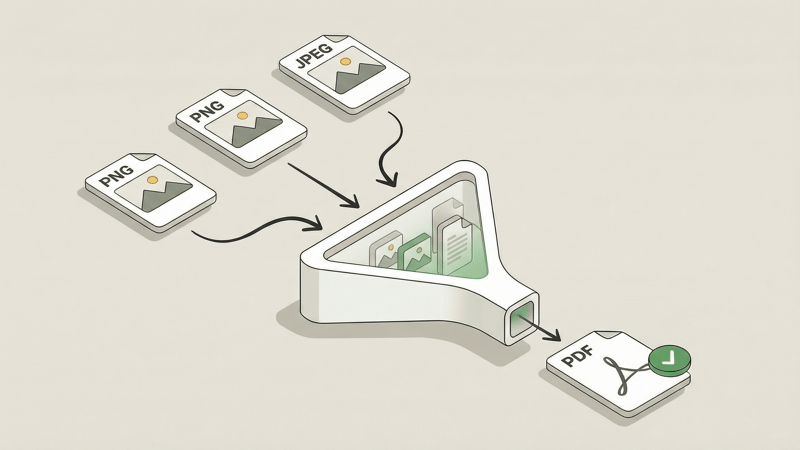
Got a stack of photographed bank statements sitting on your phone? Need to turn them into a PDF?
We built a tool for exactly that.
Introducing Bank PDF Converter's free Image to PDF tool. No sign-ups, no uploads to external servers, 100% private in your browser. Just drag your images, arrange them, and download your PDF.
The Problem
You photographed your bank statements—maybe because your bank only mails paper copies, or because you needed to capture them quickly.
But a handful of JPEGs or PNGs isn't very useful when you need to:
- Share statements with your accountant
- Upload them to a financial service that expects PDF
- Archive them in a consistent format
- Extract the transaction data
You need those images in a single, organized PDF.
Key Features
100% Browser-Based
Your images never leave your device. Everything runs locally in your browser—no uploads to remote servers, no data collection, no privacy concerns. This matters especially when you're handling financial documents.
Drag to Reorder
Out of order? Just drag your images into the right sequence before converting.
Preserves Original Quality
Your images are embedded at their original resolution. No compression, no quality loss, no blurry text.
Multiple Page Sizes
Choose the output format that works for you:
- US Letter — Standard 8.5" × 11" for North American documents
- A4 — International standard paper size
- Original — Match each page to its source image dimensions
No Usage Limits or Signup Required
Use it as much as you want. There's no account required, no daily caps, and no hidden fees. It's genuinely free.
Who It's For
- People with photographed bank statements — Turn phone photos into PDFs ready for processing
- Anyone scanning documents page by page — Combine separate scans into one file
- Business users collecting receipts — Merge expense receipts into organized PDFs
- Anyone who needs images in PDF format — Simple, fast, private conversion
If you've got images that belong together in a single document, this tool handles it.
It's not limited to just bank statement images; you can combine any images into a PDF.
How to Use It
- Drop your images — Drag and drop PNG or JPEG files
- Arrange your pages — Drag to reorder if needed
- Download your PDF — One click, instant download
That's it. No account creation, no waiting, no privacy trade-offs.
Next Step: Extract Your Transactions
Now you've got a PDF of your bank statement—but you probably want the data inside it. Transaction dates, descriptions, & amounts.
That's what Bank PDF Converter does. Upload your PDF, and AI extracts every transaction into a clean spreadsheet. It handles messy layouts, multi-page statements, and validates the math so you can trust the output.
It's the natural next step after combining your statement photos.
Try It Now
Ready to convert? Head over to our Image to PDF Converter and give it a spin.